

23 Mar Microsoft Copilot evolution from AI Assistant to Intelligent Agents
Artificial intelligence is changing the way people work, communicate, and process information. The latest technological advancement that is changing the way people work is Microsoft Copilot , an artificial intelligence digital assistant created by Microsoft , also known as “Bing Chat” before it was introduced to the public in 2023. The digital assistant is designed to work with people to generate content, analyse data, perform tasks, and increase productivity across various applications.
From chatbots to artificial intelligence digital assistants for complex tasks, Microsoft Copilot has come a long way since it was first introduced. This blog is a journey of Microsoft Copilot, starting from when it was first introduced to the public to the latest updates about the digital assistant.
What is Microsoft Copilot?

As AI is becoming an integral part of our daily activities. One such product that is helping drive this trend is Microsoft Copilot. It is an AI-powered assistant that can help individuals finish tasks faster by utilizing the latest in artificial intelligence and productivity tools.
The concept of an AI assistant was first popularized by chatbots such as ChatGPT. The difference between the original concept and Microsoft’s version is that instead of keeping the AI separate and a chatbot itself, Microsoft has decided to integrate it into our daily tools. The integration makes AI assistants no longer just a simple Q and A system but a practical assistant that can help users during their daily activities.
Understanding How Copilot Fits into Daily Work
The reason why Copilot is intriguing is that it easily integrates into our daily lives. Instead of having to remember complex commands or learn various software tricks, users can simply engage with technology in a very human way: by asking questions or providing instructions.
For example, within Microsoft 365, users can engage in a variety of activities with Copilot’s help, including:
• Creating documents
• Creating summaries of emails or reports
• Creating presentations based on notes
• Analyzing data within a spreadsheet
• Providing explanations or insights into various topics
The other notable feature of Copilot is its chat functionality, which allows users to engage with this technology in a very human way. Need help creating a proposal? Want to create a summary of a meeting? Just ask!
Copilot has begun to feel less like a technology and more of a partner that helps users work smarter instead of harder.
The Big Moment – Microsoft Copilot Branding and Launch (2023)
Although Microsoft had been working on AI assistants for some time, 2023 was the year everything came together. The company decided to create a single brand for its AI efforts, which was called Copilot.
Instead of having different AI features across applications, everything was now under the Microsoft Copilot umbrella.
This was a major branding move, signalling the company’s intent to integrate AI across its entire ecosystem. The Copilot brand was now being used across many applications, platforms, and tools.
The intent was simple – create a single AI assistant that works with everything.
With the integration of Copilot into daily applications, Microsoft was launching a new way of interacting with applications. Instead of navigating complex user interfaces, users can now use the AI for assistance.
This was a major launch, as the company was riding the wave of the popularity of generative AI tools, which were revolutionizing the way people create, analyze, and share information.
How Microsoft Copilot Features Have Changed Over Time
When Microsoft Copilot was first released, it was basically just a chatbot that people could chat with.
Of course, that was not meant to be for very long, as Microsoft has been continuously improving its features to make it a useful tool that people can actually benefit from.
Some of the things that Microsoft Copilot can do now include:
- Write or improve documents
- Sum up long meetings or discussions
- Review data and highlight important information
- Suggest responses when writing emails
- Do other tasks in workplace applications
Given these changes, Microsoft Copilot is no longer just a chatbot but a useful tool that people can benefit from when working.
The Next Shift — From Prompting to AI Agents
One of the most exciting developments in Copilot’s journey is the transition from prompt-based assistance to AI agents.
Initially, Copilot worked mostly by responding to user prompts. A person would type a request, and the AI would generate an answer or perform a task.
But the next generation of Copilot goes further.
Instead of waiting for instructions at every step, AI agents can handle multi-step tasks automatically.
For example, an AI agent might:
• Review incoming emails
• Extract important information
• Generate a summary report
• Schedule follow-up meetings
• Update project documentation
All of this could happen with minimal user intervention.
This shift introduces the idea of AI-powered digital teammates—systems that don’t just respond to commands but actively assist in completing complex work.
As AI agents continue to improve, they may become essential collaborators in the modern workplace.
Real-World Applications and Enterprise Adoption
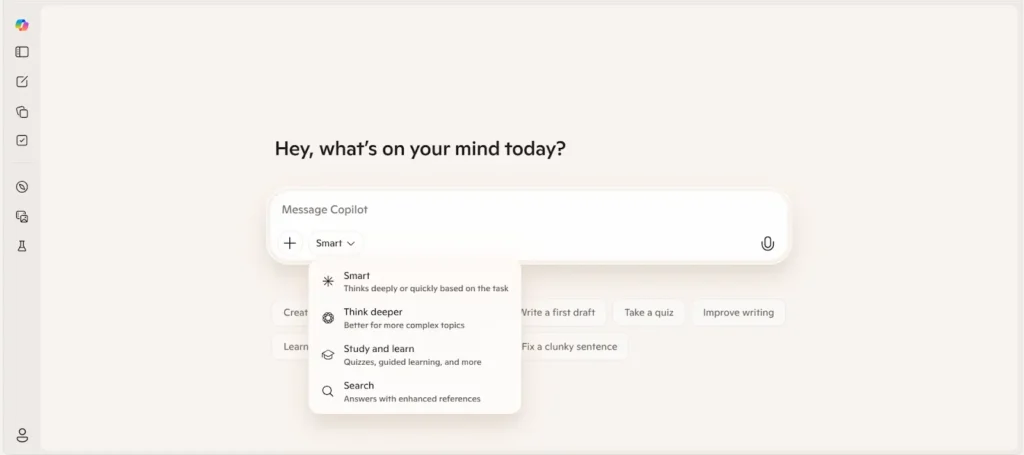
Currently, many organizations are beginning to use Microsoft Copilot in their daily activities in a bid to boost their productivity. Instead of doing some tasks manually, an organization can use Copilot to help them save some time. Some of the real-world applications of Copilot include:
Making quick summaries: It can help in creating quick summaries for long texts, reports, and emails.
Preparing presentations fast: It can help in preparing presentations from ideas and notes.
Helping in customer communication: Organizations use Copilot in communicating with customers by preparing responses for customer emails.
Analyzing business data: It can help in analyzing data and identifying useful trends and insights from the data.
Supporting enterprise applications: It can also help in supporting business applications such as Dynamics 365 in helping organizations boost their productivity in managing their sales and operations.
Due to these real-world applications of Copilot, many organizations are beginning to use AI assistants such as Copilot.
Looking Ahead — The Future of Microsoft Copilot
The evolution of Copilot is far from over. As artificial intelligence continues to advance, the capabilities of AI assistants are expected to expand dramatically.
Future developments may include:
• More natural voice conversations with AI
• Deeper integration across software platforms
• Autonomous AI agents that manage workflows
• Real-time decision support for businesses
Another important trend is the rise of AI collaboration, where humans and AI systems work together as partners rather than tools and users.
In this vision of the future, Copilot may function as a central hub for managing tasks, organizing information, and coordinating digital work environments.
If these developments continue, AI assistants could become as essential to productivity as email, spreadsheets, or cloud storage.
Final Thoughts
The story of Microsoft Copilot is a testament to the tremendous rate at which technology based on artificial intelligence is advancing. What began as a simple conversational tool has grown into a powerful tool that has the ability to create content, analyse data, and automate complex tasks.
By incorporating artificial intelligence into our daily lives, Microsoft has created a conversational tool that is less a program and more a natural extension of our own productivity.
The technology that drives Microsoft Copilot from a conversational tool into a powerful artificial intelligence agent has the ability to revolutionise the way we think about productivity.
The future of productivity may not be based on creating smarter technology, but on creating smarter ways for humans and technology to work together.
Sorry, the comment form is closed at this time.